Showing posts with label Extension Methods. Show all posts

Monday, August 8, 2011

Enumerable.Any vs. Enumerable.Count

JetBrains dotPeek LogoThis is the innagural entry into the section of my blog I'm calling "dotPeek of the Week." Workload permitting, it will be a weekly thing where I'll be using JetBrain's dotPeek - a free .NET decompiler to learn more about the .NET framework and share any interesting things I come up with.

In this post, I'll be sharing a little tip I picked up from my friend David Govek.

I can't .Count() the number of times I've seen a line of code like this one:
if (someEnumerable.Count() > 0) 
    doSomething();

I know I've done that myself a handful of times. I think it comes from the pre-.net 3.5 days when you were used to dealing with ICollections that had a .Count property that returned the value of a private field:
public virtual int Count { get { return this._size; } }

When 3.5 came out, the System.Linq.Enumerable class brought with it a Count extension method. I believe it was at that point that people started using .Count() everywhere, including on IEnumerables, which previously didn't have a method for getting the length of the enumerable.

Most of the time, there was very little pain because the engineers over at Microsoft were clever enough to help us out. The first thing they try to do in the .Count extension method is check to see if the IEnumerable is an ICollection. If it is, they just use the Count property which we already know is plenty fast; however, if it's not an ICollection, they have to iterate the Enumerable and count the elements.

Here's what that looks like:
public static int Count<TSource>(this IEnumerable<TSource> source)
{
  if (source == null)
    throw Error.ArgumentNull("source");

  ICollection<TSource> collection1 = source as ICollection<TSource>;
  if (collection1 != null)
    return collection1.Count;

  ICollection collection2 = source as ICollection;
  if (collection2 != null)
    return collection2.Count;

  int num = 0;
  using (IEnumerator enumerator = source.GetEnumerator())
  {
    while (enumerator.MoveNext())
      checked { ++num; }
  }
  return num;
}

If your source is indeed an Enumerable, this is still a fine way to find out how many items there are. The problem is, in the sample code where we're just simply checking to ensure that the Enumerable isn't empty, using .Count can prove costly. Checking that the count is greater than 0 has to enumerate the entire collection and count each item despite the fact that we know it's not empty as soon as we spot the first element.

Fortunately, the clever folks at Microsoft thought of this and also gave us .Any(). This extension method simply gets the Enumerator, calls .MoveNext(), and disposes the Enumerator. MoveNext tries to move to the next element in the collection and returns true until it passes the end of the collection.

Here's what the .Any() method looks like:
public static bool Any(this IEnumerable<TSource> source)
{
  if (source == null)
    throw Error.ArgumentNull("source");

  using (IEnumerator<TSource> enumerator = source.GetEnumerator())
  {
    if (enumerator.MoveNext())
      return true;
  }

  return false;
}

Thus, there's no need to Enumerate the entire Enumerable if you can use .Any() like this refactored code:
if (someEnumerable.Any()) 
    doSomething();

Monday, July 25, 2011

C# Yield Keyword, IEnumerable<T>, and Infinite Enumerations

Matryoshka DollsVisual Studio 2005 came with a slew of .net and .net compiler features. One of those features that I particularly enjoy is the yield keyword. It was Microsoft's way of building IEnumerable (or IEnumerator) classes and generic classes around your iterator code block. I'm not going to discuss the yield keyword much in this post because the feature has been around a long time now and the internet is replete with discussions on the topic.

Despite the long life of the yield keyword, I still find it conspicuous when I see it in projects I work on. I suppose it's just rare that I find myself writing my own enumerable. As a result, when I see yield return, it tends to stand out. I started looking around to see how the rest of the programming world uses the yield keyword wondering if I was under-utilizing the flexibility provided.

Specifically, I wondered if I was missing out on the lazy nature of the iterator and the numerous linq extension methods optimized to take advantage of that aspect of iterators. What I mean by that is that an iterator doesn't need to store each sequential value in memory the way a collection would and thus you can use each value without necessarily increasing the memory overhead. Further, you can take advantage of calculations which tend to already be sequential in nature (like the Fibbonacci sequence for example).

The second thing I thought about was an infinite (well, sort of infinite) enumerable. I'm not sure if I feel like it's a bad idea or not so I wrote these examples to be unending? I may eventually find a use for such an iterator and then get burned when someone tries to call Fibbonacci.Min() and the application throws an overflow exception, but I suppose at that point I'll make it a method and take a sanity check variable.

In the meantime, here are a few examples of some iterators I thought were interesting and fun challenges:
static IEnumerable<ulong> Fibbonacci
{
    get
    {
        yield return 0;
        yield return 1;

        ulong previous = 0, current = 1;
        while (true)
        {
            ulong swap = checked(previous + current);
            previous = current;
            current = swap;
            yield return current;
        }
    }
}

static IEnumerable<long> EnumerateGeometricSeries(long @base)
{
    yield return 1;

    long accumulator = 1;
    while (true)
        yield return accumulator = checked(accumulator * @base);
}

static IEnumerable<ulong> PrimeNumbers
{
    get
    {
        var prime = 0UL;
        while (true)
            yield return prime = prime.GetNextPrime();
    }
}

static IEnumerable<List<uint>> PascalsTriangle
{
    get
    {
        var row = new List<uint> { 1 };
        yield return row;

        while (true)
        {
            var last = row[0];
            for (var i = 1; i < row.Count; i++)
            {
                var current = row[i];
                row[i] = current + last;
                last = current;
            }

            row.Add(1);
            yield return row;
        }
    }
}

Some of these methods use a few extension methods I adapted from places in the .net framework:
public static ulong GetNextPrime(this ulong from)
{
    for (var j = from + 1 | 1UL; j < ulong.MaxValue; j += 2)
        if (j.IsPrime())
            return j;

    return from;
}

public static bool IsPrime(this ulong value)
{
    if ((value & 1) != 0)
    {
        var squareRoot = (ulong)Math.Sqrt((double)value);
        for (ulong i = 3; i <= squareRoot; i += 2)
            if (value % i == 0)
                return false;

        return true;
    }
    return value == 2;
}

To keep the test console app clean, of course, I used my favorite IEnumerable.Each() extension method:
public static void Each<T>(this IEnumerable<T> enumerable, Action<T> action)
{
    foreach (var element in enumerable)
        action(element);
}

Here's the sample code:
static void Main()
{
    Fibbonacci.Skip(10).Take(10).Each(Console.WriteLine);
    Console.WriteLine();

    EnumerateGeometricSeries(2).Take(10).Each(Console.WriteLine);
    Console.WriteLine();

    PrimeNumbers.Where(p => p > 600).Take(10).Each(Console.WriteLine);
    Console.WriteLine();

    foreach (var row in PascalsTriangle.Take(10))
    {
        row.Each(element => Console.Write("{0} ", element)); 
        Console.WriteLine();
    }

    Console.ReadLine();
}

// The second set of 10 elements in the Fibbonacci sequence
// 55 89 144 233 377 610 987 1597 2584 4181

// Base of 2 to the first 10 powers
// 1 2 4 8 16 32 64 128 256 512

// The first 10 prime numbers greater than 600
// 601 607 613 617 619 631 641 643 647 653

// The first 10 rows of Pascal's Triangle
// 1
// 1 1
// 1 2 1
// 1 3 3 1
// 1 4 6 4 1
// 1 5 10 10 5 1
// 1 6 15 20 15 6 1
// 1 7 21 35 35 21 7 1
// 1 8 28 56 70 56 28 8 1
// 1 9 36 84 126 126 84 36 9 1

Tuesday, July 19, 2011

Extension Method to Replace foreach With Lambda Expression

It's pretty often I find myself looping through some enumerable and performing an action on the elements. Sometimes it's just displaying results with Console.WriteLine. Other times I need to do something a little more complicated. In any case, every once in a while, I feel like the foreach statement and the for statement aren't really quite expressive enough.

That's why I have this little guy:
public static void Each<T>(this IEnumerable<T> enumerable, Action<T> action)
{
    foreach (var element in enumerable)
        action(element);
}

It's pretty basic but I like the way it looks and feels. I used it in my blog post about a C# UpTo Extension Method a la Ruby's int.upto method.

Here's a simple demonstration I wrote in LinqPad:
void Main()
{
    Enumerable.Range(1, 5).Each(Console.WriteLine);
}

static class Extensions
{
    public static void Each<T>(this IEnumerable<T> source, Action<T> action)
    {
        foreach (var element in source)
            action(element);
    }
}

In writing this post (and perhaps because I've been spending way too much time with jQuery lately), it occurred to me that I may want to be able to chain my actions with another Each() or with other extensions from Linq perhaps:
void Main()
{
    Enumerable.Range(1, 5).Each(Console.WriteLine).Each(Console.WriteLine);
    // 1 2 3 4 5 1 2 3 4 5
}

static class Extensions
{
    public static IEnumerable<T> Each<T>
        (this IEnumerable<T> source, Action<T> action)
    {
        foreach (var element in source)
            action(element);
   
        return source;
    }
}

The problem is though, that generally you don't want your action to enumerate your enumerable until something is to be done with the results. Instead, you often want it to be executed during the enumeration of your enumerable, so you'd write it like this:
void Main()
{
    Enumerable.Range(1, 10)
        .Each(Console.WriteLine)
        .Where(i => i <= 5)
        .ToList();
    // 1 2 3 4 5 6 7 8 9 10
    
    Console.WriteLine();
    
    Enumerable.Range(1, 10)
        .Each(Console.WriteLine)
        .Take(5)
        .ToList();
    // 1 2 3 4 5

    Console.WriteLine();

    Enumerable.Range(1, 10)
        .Each(Console.WriteLine)
        .Skip(5)
        .Take(5)
        .ToList();
    // 1 2 3 4 5 6 7 8 9 10
}

static class Extensions
{
    public static IEnumerable<T> Each<T>
        (this IEnumerable<T> source, Action<T> action)
    {
        foreach (var element in source)
        {
            action(element);
            yield return element;
        }
    }
}

Tuesday, November 16, 2010

Improved UpTo Extension Method

RubyBack in May of '09, I wrote a post about an extension method to mimic Ruby's upto.

Today, I was hanging out at Visual Studio Live and had another idea. In Ruby, the upto method takes an end value and executes a code block. In C#, interpreted this as an extension method that takes an end value and an action. They syntax ends up being pretty similar and it works fine.

Lately, I've been using an Each extension method for IEnumerables. I know an Each extension method seems like a waste, but I like the fluency of it for basic actions. So, given that I have the Each method on IEnumerable<T> anyway, I decided UpTo should really return an IEnumerable as well.

Here's my new UpTo extension method:
public static IEnumerable<int> UpTo(this int start, int end)
{
    while (start <= end)
        yield return start++;
}
Now, instead of passing your action to the UpTo method like Ruby's upto, you get your enumerable and pass your delegate to your Each extension method. Here's what it looks like:
static void Main()
{
    //for (int i = 5; i <= 10; i++)
    //{
    //    Console.WriteLine(i);
    //}

    5.UpTo(10).Each(Console.WriteLine);
    
    Console.ReadLine();

    // output
    // 5
    // 6
    // 7
    // 8
    // 9
    // 10
}
If you're using .Net 3.5 or newer, Linq shipped with an Enumerator class which has a Range static method so your code could look more like this:
public static class NumericExtensions
{
    public static IEnumerable<int> UpTo(this int start, int end)
    {
        return Enumerable.Range(start, end - start + 1);
    }
}

class Program
{
    static void Main()
    {
        //foreach (var i in Enumerable.Range(5, 6))
        //{
        //    Console.WriteLine(i);
        //}

        5.UpTo(10).Each(Console.WriteLine);
        
        Console.ReadLine();

        // output
        // 5
        // 6
        // 7
        // 8
        // 9
        // 10
    }
}
Another reason to make UpTo return an IEnumerable instead of making it a void action executer is because sometimes you don't really want to pass a large anonymous method to the Each method. You can use the same UpTo method like this:
static void Main()
{
    //foreach (var i in Enumerable.Range(5, 6))
    //{
    //    // Do a lot of stuff!!
    //}

    //5.UpTo(10).Each(i =>
    //    {
    //        // Do a lot of stuff!!
    //    });

    foreach (var i in 5.UpTo(10))
    {
        // Do a lot of stuff!!
    }
}

Wednesday, October 21, 2009

IComparable.Between Extension Method

IComparableT-SQL has a between statement to make it easier to determine if a test object occurs between two other objects. I needed similar functionality in C# but I didn't know what the type the objects would be; however, I did know they would always be IComparable. Obviously, there's no real need for an extension method here, but it did make things a bit more convenient.
Like T-SQL, the between extension method is inclusive and the start parameter doesn't have to be lower than the end parameter.

Here's what some test cases look like:
5.Between(1, 10) // true
5.Between(10, 1) // true
5.Between(10, 6) // false
5.Between(5, 5)) // true

Here's the method:
public static bool Between<T>(this T target, T start, T end)
    where T : IComparable
{
    if (start.CompareTo(end) == 1)
        return (target.CompareTo(end) >= 0) && (target.CompareTo(start) <= 0);

    return (target.CompareTo(start) >= 0) && (target.CompareTo(end) <= 0);
}

Strongly Typed GetValue Extension Method for SqlDataReader

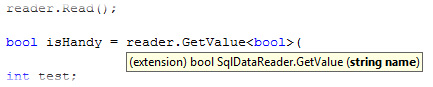
SqlDataReader GetValue Extension MethodFor a very long time, I've been bitching about the fact that the methods on the System.Data.SqlDataReader class which get a strongly typed result don't have overloads that take column names. I've seen a number of blogs that say, "the reason you can't do this is because you can't overload a method on return type," which is true but irrelevant. I don't see any reason the GetInt32(int i) method couldn't have a GetInt32(string name) overload that handles the GetOrdinal(string name) on your behalf (other than the fact that nobody wanted to write the two dozen overloads.

Well, finding this state of affairs unacceptable, I decided to rectify it. I expected it to be either difficult or annoying depending on the solution I accepted. First, I decided that it should be an extension method because I love extension methods and the fluency they provide. I also decided that it should be generic so you could have one method and specify the desired type. The tough decision came when I was trying to figure out how to handle all of the conversions between types.

Should I switch on the generic type and call the associated method on the SqlDataReader? That is to say, if you call GetValue should I call SqlDataReader.GetInt32 or should I just get the value as an object and handle all of the converting myself? Well, I decided that I'd rather deal with the difficulty of the type conversions than have a big ugly case statement in my method.

Then, I was looking around in the .net classes and found System.Convert.ChangeType and it made the whole process considerably easier. We also had a need to attempt to return the value as a specified type without throwing an exception if it failed (like int.TryParse) so I included a TryGetValue method as well.
public static T GetValue<T>(this SqlDataReader reader, string name)
{
    return (T)Convert.ChangeType(reader[name], typeof(T));
}

public static bool TryGetValue<T>(this SqlDataReader reader, string name, out T output)
{
    try
    {
        output = reader.GetValue<T>(name);
        return true;
    }

    catch (Exception ex)
    {
        if (ex is InvalidCastException || ex is FormatException || ex is OverflowException)
        {
            output = default(T);
            return false;
        }

        else
            throw;
    }
}

// usage examples

// string testString;
// bool result = reader.TryGetValue<string>("ColumnName", out testString);

// int testInt;
// bool result = reader.TryGetValue<int>("ColumnName", out testInt);

// int i = reader.GetValue<int>("ColumnName");
// string s = reader.GetValue<string>("ColumnName");
// DateTime dt = reader.GetValue<datetime>("ColumnName");

Friday, June 12, 2009

Soundex Extension Method for C#

British AirwaysI've been pretty swamped at work lately so I've not been blogging much. Worse than that, I haven't really been able to do much creative programming and virtually nothing academic.

A few days ago, I was working on some basic name searching and recognized an opportunity to squeeze in some play time. It occurred to me that the users of our application will be looking people up by name and will often not know how to spell the name correctly.

I wanted to allow users to search for people by name without regard for different spellings. For example, if you're looking for Geoff McArther or Jeff MacArther, both names will be returned by the same search term.

To do this, I used a technology invented back in the 1920s for the US Census called soundex. The following is a set of extension methods that implement the soundex phonetic algorithm:
public static string Soundex(this string s)
{
// by default, a soundex is the first letter
// followed by three numbers
return Soundex(s, 4);
}

public static string Soundex(this string s, int length)
{
return FullSoundex(s)
.PadRight(length, '0') // soundex is no shorter than
.Substring(0, length); // and no longer than length
}

public static string FullSoundex(this string s)
{
// the encoding information
const string chars = "ABCDEFGHIJKLMNOPQRSTUVWXYZ";
const string codes = "0123012D02245501262301D202";

// some helpful regexes
Regex hwBeginString = new Regex("^D+");
Regex simplify = new Regex(@"(\d)\1*D?\1+");
Regex cleanup = new Regex("[D0]");

// i need a capitalized string
s = s.ToUpper();

// i'm building the coded string using a string builder
// because i think this is probably the fastest and least
// intensive way
StringBuilder coded = new StringBuilder();

// do the encoding
for (int i = 0; i < s.Length; i++)
{
int index = chars.IndexOf(s[i]);
if (index >= 0)
coded.Append(codes[index]);
}

// okay, so here's how this goes . . .
// the first thing I do is assign the coded string
// so that i can regex replace on it
string result = coded.ToString();

// then i remove repeating characters
//result = repeating.Replace(result, "$1");
result = simplify.Replace(result, "$1").Substring(1);

// now i need to remove any characters coded as D from
// the front of the string because they're not really
// valid as the first code because they don't have an
// actual soundex code value
result = hwBeginString.Replace(result, string.Empty);

// i used the char D to indicate that an h or w existed
// so that if to similar sounds were separated by an h or
// a w that I could remove one of them. if the h or w does
// not separate two similar sounds, then i need to remove
// it now
result = cleanup.Replace(result, string.Empty);

// return the first character followed by the coded
// string
return string.Format("{0}{1}", s[0], result);
}
Now, it may not yet be perfect as I had a pretty hard time finding the exact specs for the American soundex, but it should be pretty close. If you notice something wrong, please leave me a comment and I'll correct it.

Tuesday, May 12, 2009

Extension Method to Imitate Upto() in Ruby

RubyLast month, I wrote a blog post about using an extension method to imitate the ruby method times(). I recently found another cool method in ruby that I wanted to avail to the C# public.

Now, before I show you the implementation, I'll just say that it doesn't do anything the for loop wouldn't do on its own. I think the method has two benefits. One, I think it looks clean because it's basically a fluent way to create a for loop. Two, I like the fact that you can pass an action to the method.

In Ruby, the implementation looks like this:
5.upto(10){ |i| puts i; }

# output
# 5
# 6
# 7
# 8
# 9
# 10
I added the following extension method to one of my utility extension method libraries:
public static void UpTo(this int start, int upto, Action<int> action)
{
for (int i = start; i <= upto; i++) action(i);
}
Here are the test cases and the results:
[TestCase(4, 12)]
[TestCase(-10, 10)]
[TestCase(10, 5)]
public void test_upto_iterator(int from, int upto)
{
int test = 0;
from.UpTo(upto, num =>
{
Console.WriteLine("Index: {0}", num);
test += num;
}
);

int expected = 0;
for (int i = from; i <= upto; i++)
expected += i;

Assert.AreEqual(expected, test);
}

// ***** ESG.Utilities.System.Tests.IntegerExtensionTests.test_upto_iterator(-3,2)
// Index: -3
// Index: -2
// Index: -1
// Index: 0
// Index: 1
// Index: 2

// ***** ESG.Utilities.System.Tests.IntegerExtensionTests.test_upto_iterator(4,8)
// Index: 4
// Index: 5
// Index: 6
// Index: 7
// Index: 8

Thursday, April 30, 2009

Extension Method to Imitate Times() in Ruby

RubyMy friend and co-worker James is gettin' pretty darned good with Ruby. My experience with Ruby is severely limited. So far, the only thing I've done with it was to implement a "business rules engine" to host a DSL in Iron Ruby.

Today, he showed me a pretty cool method that's built into Ruby called int.times() and I was pretty much instantly jealousified! I decided I had to have one . . . and now I do:
public static void Times(this int times, Action action)
{
for (int i = 0; i < times; i++) action();
}
I through together a few test cases to try it out. I had to make a few determinations though. If you call .Times on a negative number, it loops indefinitely (seemingly). I decided that you should never want to say "do something infinity times." If you do want to do that, you should just have your action call itself at the end of its execution. So, here's the test and the output:
[TestCase(4)]
[TestCase(-6)]
public void test_times_iterator(int times)
{
int i = 0;
times.Times(() =>
{
Console.WriteLine("Index: {0}", i);
i++;
});

Assert.AreEqual(Math.Max(times, 0), i);
}

// Index: 0
// Index: 1
// Index: 2
// Index: 3

Wednesday, April 29, 2009

IComparer Extension Methods for Fluent Interface

IComparerI've pretty much been a blogging fiend today! I love it when I find a topic like IComparer or Extension Methods that are entertaining enough to write about.

Today alone, I wrote articles about how IComparer works, using the proxy pattern to sort by multiple IComparers, and converting a Comparison delegate to an IComparer. Bragging aside though, I've found a fun way to combine my current favorite topics: IComparer and Extension Methods.

I wrote 3 extension methods to help me do some pretty neat things with IComparers and Comparisons. You'll see references to two of my prior articles in this post. The ComparerProxy sorts by multiple comparers and the ComparisonComparer converts a Comparison to an IComparer.

I'll show you the extension methods first, then I'll explain the reasoning behind them, and then I'll show you some usage.
public static class IComparerExtensions
{
public static IComparer<T> Then<T>(this IComparer<T> priority, IComparer<T> then)
{
return new ComparerProxy<T>(priority, then);
}

public static IComparer<T> Invert<T>(this IComparer<T> comparer)
{
return new ComparisonComparer<T>((x, y) => comparer.Compare(x, y) * -1);
}

public static IComparer<T> ToComparer<T>(this Comparison<T> comparison)
{
return new ComparisonComparer<T>(comparison);
}
}
So, lately I've been pretty big on fluent interfaces. I haven't written one yet, but I do use extension methods to make my implementations look a little more fluent. That's why, when I wrote the ComparerProxy, I thought, "Hey, wouldn't be cool if I could just take an IComparer and tack another comparer onto it? And then another? And another?" That's why I wrote the IComparer.Then() extension method.

Next, I realized that if you have a Comparison delegate, it'd be nice to be able to add that to a list of IComparers so I added the ToComparer method.

Finally, another thing that I often want to do is write an IComparer once but to be able to use it in reverse. Id est, I want to invert the logic. Obviously, I could List.Sort() and List.Reverse(), but that's much less efficient than having a CaseInsensitiveComparer and a ReverseCaseInsensitiveComparer.

The problem is, I don't really want to have to write both of those comparers. Instead, now I can call IComparer.Invert() and I get an IComparer that performs exactly like the original, but with inverted logic.

So, without further ado, here are some usage examples. I'm using the same test setup as I did with the ComparerProxy. I've also created several more IComparers to try out:
Comparison<Person> length = (x, y) => x.ToString().Length - y.ToString().Length;
IComparer<Person> lengthLast = new ComparerProxy<Person>(length.ToComparer(), last);

IComparer<Person> lastFirstComposed = last.Then(first);
I executed the following lines which produced the commented results:
_folks.Sort(length);
PrintList(_folks);

// Woody, Pete
// Woody, Lauren
// Caldwell, Cory
// Caldwell, Colin
// Brechtel, Jamus
// Woody, Royce Ann
// Brechtel, Ashley
// Caldwell, Jennifer


_folks.Sort(lengthLast);
PrintList(_folks);

// Woody, Pete
// Woody, Lauren
// Caldwell, Cory
// Brechtel, Jamus
// Caldwell, Colin
// Brechtel, Ashley
// Woody, Royce Ann
// Caldwell, Jennifer


_folks.Sort(lastFirstComposed);
PrintList(_folks);

// Brechtel, Ashley
// Brechtel, Jamus
// Caldwell, Colin
// Caldwell, Cory
// Caldwell, Jennifer
// Woody, Lauren
// Woody, Pete
// Woody, Royce Ann


_folks.Sort(last.Invert().Then(first));
PrintList(_folks);

// Woody, Lauren
// Woody, Pete
// Woody, Royce Ann
// Caldwell, Colin
// Caldwell, Cory
// Caldwell, Jennifer
// Brechtel, Ashley
// Brechtel, Jamus

Tuesday, April 7, 2009

Extension Method to Join Strings with a Delimiter

String ArrayI was talking with my coworker James Brechtel today about writing an extension method to join an array of strings together with a delimiter like string.Join() does. I'd prefer string[].Join() because it seems more fluent.

After I put the IList<T>.ToArray<T>() extension method together, implementing the fluent style join was a simple task.

Here's what that looks like:
public static string Join(this IList<string> list, string separator)
{
return string.Join(separator, list.ToArray());
}
That's it! :)

ToArray Extension Method Converts IList<T> to T[]

String ArrayI was talking with my coworker James Brechtel today about writing an extension method to join an array of strings together with a delimiter like string.Join() does. I'd prefer string[].Join() because it seems more fluent. I was throwing the IList<string>.Join() method together when I ran into a small snag.

I needed an array of strings for the string.Join() method. I put together a quick ToArray<T>() extension method which iterated through each item in the array and created an array T[]. The problem is, if I already have an array, that's a lot of extra work and some wasted memory.

So, I tried IList<T> is Array and it works great. I just cast the IList<T> as T[] and return it. Otherwise, I execute the iteration. Here's what it looks like:
public static T[] ToArray<T>(this IList<T> list)
{
if (list is Array) return (T[]) list;

T[] retval = new T[list.Count];
for (int i = 0; i < retval.Length; i++)
retval[i] = list[i];

return retval;
}
Pretty basic, but nice n' fast.

Monday, March 16, 2009

More IList Extension Methods: Quickselect-ing from an Unsorted List

Continuing my extension method kick and inspired by my extension method to select an item from an unsorted list that bets fits comparison criteria, I decided I wanted to try to implement an extension method to select from the list the kth best fit rather than just the best fit.

I left the best fit methods intact because they achieve worst case O(n) time, but the kth select worst case is O(n log n) because the worst case would quicksort the entire array. I later discovered that the method I implemented is called a quickselect. It's a divide an conquer algorithm based on the partitioning scheme of the quicksort.

Basically, with the quicksort, you pick an item (called the pivot) from the list and then put everything smaller than the pivot on the left and everything larger on the right. Then, you recursively quicksort each side of the pivot.

The quickselect uses the same technique, but rather than quicksorting both sides of the pivot, you quicksort only the side which contains the element you're looking for. Id est, if your pivot ends up at index 5 and you're looking for index 7, then you partition the right side. If the next pivot is index 8, then you partition the left side. You keep doing that until your pivot ends up being the index you're looking for.

Here's what the partition methods look like. There's really not a great reason to make them public, but there's also not a good reason to leave them private.
public static int Partition<T>
(this IList<T> list, Comparison<T> comparison, int left, int right)
{
int i = left;
int j = right;

// pick the pivot point and save it
T pivot = list[left];

// until the indices cross
while (i < j)
{
// move the right pointer left until value < pivot
while (comparison(list[j], pivot) > 0 && i < j) j--;

// move the right value to the left position
// increment left pointer
if (i != j) list[i++] = list[j];

// move the left pointer to the right until value > pivot
while (comparison(list[i], pivot) < 0 && i < j) i++;

// move the left value to the right position
// decrement right pointer
if (i != j) list[j--] = list[i];
}

// put the pivot holder in the left spot
list[i] = pivot;

// return pivot location
return i;
}

public static int Partition<T>(this IList<T> list, Comparison<T> comparison)
{
return list.Partition(comparison, 0, list.Count - 1);
}

public static int Partition<T>(this IList<T> list, IComparer<T> comparer)
{
return list.Partition(new Comparison<T>((x, y) => comparer.Compare(x, y)));
}

public static int Partition<T>(this IList<T> list)
where T : IComparable<T>
{
return list.Partition(new Comparison<T>((x, y) => x.CompareTo(y)));
}
Isolating the partition logic makes it really easy to implement both the quicksort logic and the quickselect logic. In fact, in case you're interested, here's what the quicksort logic looks like:
public static void QuickSort<T>
(this IList<T> list, Comparison<T> comparison, int left, int right)
{
// pivot and get pivot location
int pivot = list.Partition(comparison, left, right);

// if the left index is less than the pivot, sort left side
if (left < pivot) list.QuickSort(comparison, left, pivot - 1);

// if right index is greated than pivot, sort right side
if (right > pivot) list.QuickSort(comparison, pivot + 1, right);
}
The quickselect is basically the same thing, except that you don't quicksort both sides of pivot:
public static T QuickSelect<T>
(this IList<T> list, int k, Comparison<T> comparison, int left, int right)
{
// get pivot position
int pivot = list.Partition(comparison, left, right);

// if pivot is less that k, select from the right part
if (pivot < k) return list.QuickSelect(k, comparison, pivot + 1, right);

// if pivot is greater than k, select from the left side
else if (pivot > k) return list.QuickSelect(k, comparison, left, pivot - 1);

// if equal, return the value
else return list[pivot];
}

public static T QuickSelect<T>(this IList<T> list, int k, Comparison<T> comparison)
{
return list.QuickSelect(k, comparison, 0, list.Count - 1);
}

public static T QuickSelect<T>(this IList<T> list, int k, IComparer<T> comparer)
{
return list.QuickSelect(k, new Comparison<T>((x, y) => comparer.Compare(x, y)));
}

public static T QuickSelect<T>(this IList<T> list, int k)
where T : IComparable<T>
{
return list.QuickSelect(k, new Comparison<T>((x, y) => x.CompareTo(y)));
}

Sunday, March 15, 2009

Revised IList Extension Methods for Selecting Best Fitting Items from an Unsorted List

Several days ago, I started writing articles about extension methods. One of the articles I wrote was about an IList extension method to select the best fitting item out of an unsorted list in O(n) (linear time). I was working on another article about implementing the quicksort and quickselect algorithms as extension methods.

I got pretty tired of having the same logic implemented in multiple places, but I hadn't yet figured out how to refactor it. Well, I did, so this is an update to those methods that keeps most of the work in one place.

I think it's a pretty cool implementation, it still works correctly, and it's still relatively fast. This implementation is also still side-effect free. That's one reason to use it over a sort/select method. If you need to leave your IList unsorted, then you can't sort and select. Also, if you are selecting from items with a custom IComparer, then even if you don't care about side-effects, you're still better off using this method.

On the other hand, if you don't care about the order of your list and your list type can be sorted with the native TrySZSort, then you're better off using Array.Sort() and selecting the last item in the list. However, if it can't be externed to TrySZSort then the .Net implementation of Array.Sort() uses quicksort which is O(n log n) and the selection is O(1). That's less efficient than the O(n) implementation below.
public static T GetBestFit<T>(this IList<T> list, Comparison<T> comparison)
{
if (list == null || list.Count == 0)
throw new ArgumentException("You cannot get the best fit from an empty list!");

T currentFit = list[0];
for (int i = 1; i < list.Count; i++)
if (comparison(currentFit, list[i]) < 0)
currentFit = list[i];

return currentFit;
}

public static T GetBestFit<T>(this IList<T> list, IComparer<T> comparer)
{
return list.GetBestFit(new Comparison<T>((x, y) => comparer.Compare(x, y)));
}

public static T GetBestFit<T>(this IList<T> list)
where T : IComparable<T>
{
return list.GetBestFit(new Comparison<T>((x, y) => x.CompareTo(y)));
}

public static T GetBestFit<T>(this IList<T> list, Func<T, T, bool> rule)
{
Comparison<T> c = new Comparison<T>((x, y) => (rule(x, y)) ? 1 : -1);
return list.GetBestFit(c);
}

Friday, March 13, 2009

Extension Methods for Picking an Item out of an IList

So, I've been at it again with the extension methods. Earlier this week, I had a problem where I was getting back an array of items from a webservice. This webservice builds these objects from data in a database. The table that stores these data uses GUIDs as their primary key and there's a clustered index on the id column. As a result, if you pick 2 items from the list, there's about a 50-50 chance they're in the right order.

I really need them to be in the right order, so I tried to add an order by clause. Unfortunately, this particular webservice isn't really all that good and there's no way to order the objects returned from the database. In this case, the fact is that I really just needed the most recent record anyhow.

I know what you're thinkin' and I thought the same thing. I could just sort the array and pop the first one off the top. The problem is that (and in this case it was definitely not a problem) sorting takes O(n log n) time and it's pretty easy to get a max or a min in O(n) time. I wrote a quick, "get the most recent in linear time" loop to get the element I wanted, and it occurred to me that I found another good extension method.

The problem was, GetMostRecent isn't really all that useful because I could very wall want, GetOldest, GetFirstAlphabetically, GetHottest, etc. Instead, I implemented GetBestFit and I provided several overloads for passing comparison logic in.

The first implementation I had took a Func<T, T, bool> as the comparator; however, I later found the Comparison<T> class which became a pretty decent wrapper for the Func<T, T, bool> parameter. I thought about getting rid of it altogether, but I still like the syntax of the former. Here are those two extension methods:
public static T GetBestFit<T>(this IList<T> list, Func<T, T, bool> rule)
{
Comparison<T> c = new Comparison<T>((x, y) => (rule(x, y)) ? 1 : -1);
return list.GetBestFit(c);
}

public static T GetBestFit<T>(this IList<T> list, Comparison<T> comparison)
{
if (list == null || list.Count == 0)
throw new ArgumentException("You cannot get the best fit from an empty list!");

T currentFit = list[0];
for (int i = 1; i < list.Count; i++)
if (comparison(currentFit, list[i]) < 0)
currentFit = list[i];

return currentFit;
}
Then I realized that some objects already come with comparison information (id est, IComparable) and those objects deserve to have a GetBestFit that doesn't require you to write any comparison evaluators.
public static T GetBestFit<T>(this IList<T> list)
where T : IComparable<T>
{
if (list == null || list.Count == 0)
throw new ArgumentException("You cannot get the best fit from an empty list!");

T currentFit = list[0];
for (int i = 1; i < list.Count; i++)
if (currentFit.CompareTo(list[i]) < 0)
currentFit = list[i];

return currentFit;
}
Finally, I I thought that there are already classes responsible for comparing two objects for the sake of sorting and that getting the best fit is really just like sorting the list and taking the last item. I'm not really fixed on that one yet, but when you look at the way a comparer works and the way the sorting algorithm uses it, the "winner" always ends up at the end of the list. Anyhow, here's the IComparer implementation:
public static T GetBestFit<T>(this IList<T> list, IComparer<T> comparer)
{
if (list == null || list.Count == 0)
throw new ArgumentException("You cannot get the best fit from an empty list!");

T currentFit = list[0];
for (int i = 1; i < list.Count; i++)
if (comparer.Compare(currentFit, list[i]) < 0)
currentFit = list[i];

return currentFit;
}
I wrote a full set of test cases using NUnit, but I'll spare you having to read those. However, it seems like some implementation information might be handy, so here are a few examples. I also wrote several IComparers, but only listed one in the current post for the sake of example.

I wrote a very basic person class to use with various comparisons:
public class Person : IComparable<Person>
{
public Person(string name, DateTime birthdate)
{
Name = name;
Birthdate = birthdate;
}

public string Name { get; set; }
public DateTime Birthdate { get; set; }

public int Age
{
get
{
return DateTime.MinValue.Add(DateTime.Now.Subtract(Birthdate)).Year - 1;
}
}

public int CompareTo(Person other)
{
return this.Age.CompareTo(other.Age);
}

public class AgeComparer : IComparer<Person>
{
public int Compare(Person x, Person y)
{
if (x.Age == y.Age) return 0;
return (x.Age > y.Age) ? 1 : -1;
}
}
}
I built a list of Persons and tested each extension with several different comparisons. Here are some syntax samples:
// uses IComparable.CompareTo
list.GetBestFit()

// the rest of the tests used these variables, you know
// just in case you want to run this code
Person oldest, first;

// uses an IComparer
oldest = list.GetBestFit(new Person.AgeComparer());
first = list.GetBestFit(new Person.ReverseAlphabeticalComparer());

// uses a Comparison
oldest = list.GetBestFit(new Comparison<Person>((x, y) => x.Age.CompareTo(y.Age)));
first = list.GetBestFit(new Comparison<Person>((x, y) => y.Name.CompareTo(x.Name)));

// uses a Func<T, T, bool> rule
oldest = list.GetBestFit((x, y) => x.Age > y.Age);
first = list.GetBestFit((x, y) => x.Name.CompareTo(y.Name) < 0);

Wednesday, March 11, 2009

Extension Method to Copy One Stream to Another

I don't think I could count the number of times I've written this code:
byte[] buffer = new byte[1024];
int bytesRead = 0;

do
{
bytesRead = source.Read(buffer, 0, buffer.Length);
target.Write(buffer, 0, bytesRead);
} while (bytesRead > 0);
With my recent cravings for a good reason to write an extension method and the frustration that there's no really good way to read from one stream and write it directly to another, I thought that it'd be really cool if I never had to write these lines of code again in my life!

I looked around and found that the MemoryStream class has a WriteTo(Stream) method. I thought, "I need one of those." At first, I called mine AppendTo(Stream) because I thought that it sounded more like what it was actually going to do. I also didn't know what would happen if I had an extension method with the same signature as an instance method.

I decided I should stop being lazy and look into it. I did some extension method research and found that "an extension method with the same name and signature as an interface or class method will never be called. At compile time, extension methods always have lower priority than instance methods defined in the type itself."

So, here's the extension method I ended up with:
public static void WriteTo(this Stream source, Stream target)
{
WriteTo(source, target, 1024);
}

public static void WriteTo(this Stream source, Stream target, int bufferLength)
{
byte[] buffer = new byte[bufferLength];
int bytesRead = 0;

do
{
bytesRead = source.Read(buffer, 0, buffer.Length);
target.Write(buffer, 0, bytesRead);
} while (bytesRead > 0);
}

IsEmpty and IsNull Extension Methods on the String Class

There have been a few times I've wanted a string.IsEmpty() method that would only return true if the string was actually empty. That's an extraordinarily uncommon situation, but more common than that would be a string.IsNull() that returns false if you pass it string.Empty.

The problem is, of course, if you're going to add extension methods for IsEmpty and IsNull, you really ought to go ahead and add one for IsNullOrEmpty so you can keep all of your method calls looking the same.

Here's a set of extension methods I wrote for helping out with dealing with null or empty strings:
public static bool IsEmpty(this string s)
{
return (s != null && s.Length == 0);
}

public static bool IsNull(this string s)
{
return (s == null);
}

public static bool IsNullOrEmpty(this string s)
{
return string.IsNullOrEmpty(s);
}

Extension Method to Get Custom Attributes with Reflection

I was working on my parameter validation with PostSharp proof of concept and I needed an easy way to get a list of custom attributes of a specific type from objects in the System.Reflection namespace like MethodInfo or ParameterInfo.

I noticed that objects which take custom attributes implement ICustomAttributeProvider. There is a GetCustomAttributes(Type, Boolean) overload which will get the custom attributes of a specific type, but I like the generic syntax better. I also prefer to return an IList rather than an array, but I don't really have any reasons for or against this preference.

I wrote a generic extension method for anything that is an ICustomAttributeProvider that will return a strongly typed list of attributes on the object:
public static List<T> GetAttributes<T>(this ICustomAttributeProvider pi) 
where T : Attribute
{
List<T> attrs = new List<T>();

foreach (object a in pi.GetCustomAttributes(typeof(T), false))
if (a is T) attrs.Add(a as T);

return attrs;
}
The usage is pretty cut and dry, but you can reference the afore mentioned article: Validate Parameters Using Attributes and PostSharp

Extension Methods in C#

Extension methods have been around long enough now that most people probably already know what they are and what they're for, so I'll keep this part pretty short. Extension methods allow a developer to add methods to an already existing CLR type without decorating or sub-classing the type. This provides flexibility to strongly-typed languages like C#. For example, the fluent interface of LINQ heavily leverages extension methods.

I've been dying to come up with a good reason to write some extension methods, but until recently, I hadn't had much need for it. Now, I've written an extension method or two, have started using them in production code, and I'm addicted! Hence, the blog post you're reading now.

I also think I'm going to try a new format for posting "living documents." Previously, I've posted documents with the intent to change them periodically and post update notices. The problem is, the update notice is useless as a unit of blogging in and of itself. As a result, I think I'm going to post new extension methods separately and tag them "extension methods." That way, each additional post has value in and of itself and it'll be easy to keep track of them by browsing to extension methods search label.

Also, a convenient RSS feed is available.