Tuesday, October 27, 2020

Autopilot Against Drug Testing

Drug Testing Lab

Autopilot Consulting, LLC. can NOT support mandatory drug testing. Autopilot was founded on the belief that a business could be both successful and ethical. I believe that mandatory drug testing is unethical and therefore we can not support it.

Autopilot's core values are:
Integrity above all else.
People matter
It can always be better
If it's complicated, it's too complicated

It's exactly these core values that have led me to the decision that as a policy Autopilot would not permit staff to submit to drug testing as a condition of working with Autopilot Consulting. Drug testing provides very little value to employers and can only harm employees and staff.

Drug Testing For Employers

Drug testing provides very little value to employers. Current drug tests typically address only a small subset of abused drugs, are not particularly reliable, and are widely regarded as poor predictors of on-the-job performance.

Prescription Drugs

Pre-employment drug screening often excludes legal drugs including prescription medications (when they do include prescription medications, you begin to approach the privacy concerns mentioned below). The Americans with Disabilities Act and the Equal Employment Opportunity Commission have strong guidelines to protect the privacy of those legally taking prescription medications.

These prescription medications are often abused and contribute to workplace safety concerns that are not readily addressed by common drug screening. Even when these medications are tested for, studies have found that the screening typically does not improve safety ratings.

Alcohol

Many pre-employment drug screens do test for alcohol. While these would provide valuable information in an after-incident exam, they're not particularly good at identifying people who abuse alcohol. Alcohol is detectible in urine for up to 12 hours. There are better tests for when alcohol consumption is completely prohibited, but in the typical case, if someone who is suffering with alcohol addiction can sober up for an interview, they can also sober up for a negative drug test too.

For perspective, a study in 2003 showed that people who consume alcohol on average three or more times per week had 3.2 injuries per 10,000 person-work-days vs 1.9 injuries over the same duration for non-drinkers. This 70% increase in risk is typically not predicted by pre-employment drug screens and many people don't consider this level of alcohol consumption to be heavy use.

Detection Times

Most drugs are detectible for only a few days. Marijuana can be detectible for 1 to 2 months for chronic users but is typically less than 7 days for infrequent uses. This means that drug users (except for some marijuana users) who are looking for jobs can easily pass a pre-employment drug screening by abstaining for only a few days.

Exacerbating this problem, drug tests have a 10 to 15 percent false negative rate. Some false positives are due to weaknesses in the tests, differences between the way different people metabolize drugs, volumes of water people typically consume, etc. Others are deliberate subversions of the test. While false-negatives probably have a less dramatic impact than false positives, this does greatly reduce the value of the tests in general.

Impacts of Drug Testing on Job Performance and Safety

Some studies have been able to show a relationship between drug use and job performance and safety. Many other studies fail to show any relationship. Most studies have failed to show a correlation between drug screening and job performance and safety with several researchers suggesting alternatives for safety critical positions like computer-assisted performance tests and non-punitive employee assistance programs.

The inability to test for several classes of drug abuse, the unwillingness to treat alcohol abuse with the same vigor other drugs, and the unreliability of drug screens as a predictor of performance greatly reduce the value of drug tests as a pre-screening employment qualification.

Drug Testing for Employees

Drug testing can only serve to harm potential employees. Drug tests have an unacceptably high false-positive rate, are privacy-invasive, and have been historically biased against poor and minorities.

Harmful False-Positives

While drug tests are generally unreliable as a measure of drug use in general, the false-positive rate is an alarmingly high 5 to 10 percent. That means that if I have 10 employees undergo a drug screening as a condition of a contract with an Autopilot client, one of them will likely with a documented positive drug test. It would be unethical to require my staff to subject themselves to a test with a 10% chance of harming them or their reputation.

Privacy

I have worked with and would like to continue working with people who live in (or travel to) states (or countries) where some drugs are legal. Because these drugs are also controversial, it is reasonable for someone to prefer to keep their legal activities private. If I permit some employees to submit to drug tests, I cannot protect the privacy of all of my employees.

For example, I could allow some employees an opportunity to opt out of drug tests. The problem is that through deduction, it's possible people will come to the conclusion (correctly or incorrectly) that someone is opting out of contract opportunities to hide drug use. It's less complicated and considerably more respectful of the privacy of my staff (and thus more ethical) to not permit any employees to submit to drug tests in the first place.

Disproportionate Impact on Poor and Minorities

One study, conducted by Yale University, found that 63% of black workers were employed in a workplace that performs drug testing while only 46% of white workers were. Further, 54% of blue collar employees were tested compared to only 44% of white collar workers. In further analysis, the study found that the racial discrepancy was true among executive, administrative, managerial, and financial workers as well as technician and support occupations.

Counterintuitively, the National Bureau of Economic Research found that places where drug testing is required tend to have more racial diversity. The author of the study suggests that these differences are due to biases in the hiring process because drug tests gives minority applicants an opportunity to prove counter assumptions and prove their innocence.

This is a bias that should be eliminated by ethical thinking rather than by putting a burden of proof on job applicants.

The same author has found that drug testing policies tend to correlate with a decline in employment for women as well.

TL;DR

Drug testing provides very little value to employers because these tests typically address only a small subset of abused drugs, they are not reliable, and are widely regarded as poor predictors of on-the-job performance. Drug testing has no benefit to potential employees because the tests have an unacceptably high false-positive rate, are privacy-invasive, and have been historically biased against poor and minorities.

Our specialty is building amazing software that delights users. We believe in the value of people and we're always working to improve ourselves and those around us. We would be compromising our integrity if we didn't join in taking a stance against privacy violations and discrimination.

It's for these reasons that we respectfully decline any contracts where mandatory drug testing is a condition of the contract.

Monday, October 12, 2015

Size Matters: Improve Productivity with Cheap Screen Real Estate

Common Screen Sizes

It's hard to hire developers, and technical resources are expensive. Everyone is trying to figure out how to attract top talent, reduce turnover, and increase productivity of existing staff without reducing their work/life balance.

Early on, I decided that if you're going to spend 8 hours a day 5 days a week for almost 50 weeks a year doing something, everything about it should be as pleasant as it could be. I bought a new Macbook pro and two thunderbolt displays. Those investments very quickly paid off.

Until recently, the benefits of large technology investments were just intuition. Last week, I realized how much more productive I was working remotely than when I'm onsite with the client. One reason is that when I'm remote I get a lot more flow, but another reason is that when I'm remote, I have a lot more screen real estate so I can see a lot more information at once.

I decided it was time to be more productive onsite too. This time, I wanted to have more concrete justification.

Screen Selection

A friend of mine and I did a fair amount of research picking out monitors that gave us the best bang for our bucks. I'm really happy with my Thunderbolt Displays. They're IPS and they're quite high PPI. This time, I wanted to try something a little cheaper and a little larger and I wanted to try a VA panel so I ended up getting a BenQ BL3200PT. This monitor, I think, has the same panel as the Samsung S32D850T, which has a slightly smaller price tag.

Screen Real Estate

When I talk about screen real estate, I'm not talking about the diagonal size of the screen; I'm talking about the resolution of the screen. Having a larger screen doesn't do anything for you (at least not in the sense of a computer monitor) with regard to how much information you can fit on the screen at one time. The difference between an HD 1080 screen at 27" vs. 32" is just stretching. Resolution, however, is how many pixels the screen has. The more pixels there are, the more options the computer has to present data (provided you have the visual acuity to perceive the data without scaling).

These displays are 2560 x 1440 or WQHD and are the same resolution as my thunderbolt displays, albeit over a larger surface area. Thus the resolution is not quite as crisp as my thunderbolts, but still these are very high quality screens. If you're into lower pixel pitch and higher PPI, I don't blame you. Higher pixel density screens are much more pleasant to look at, but they do come at a cost.

Comparing Resolutions

There are two very common resolutions in offices these days. An older WSXVGA+ which is an 8:5 aspect display at 1680 x 1050 pixels. HD 1080 is also quiet popular which is the 16:9 display at 1920 x 1080. The HD 1080 has about 17.6% more pixels than the WSXVGA+. By comparison, the WQHD, also 16:9, has 2560 x 1440 pixels (sometimes called 1440P). It has about 77.8% more pixels than HD 1080 and about 110% more pixels than WSXGA+. That is to say that if you have 1 WQHD display, you have more pixels than a dual screen WSXGA+ setup.

Benefits of Screen Real Estate

The benefits of additional screen real estate, unfortunately, are easier to experience than they are to describe. Having additional real estate may mean that you will sense more data at the same time, but does not necessarily mean you will perceive these data. Similarly, having the ability see multiple windows does not mean that you won't just continue editing one file at a time in a full screen editor. On the other hand, not having the ability to optimize your workflow guarantees that you will not.

Anecdotes

I do have a few anecdotes that buttress my belief that having more screen real estate is inherently valuable. One time when I'm particularly keen to the benefits of higher resolutions is when I'm developing responsive designs. I'll often dock my browser's DOM inspector on the side and I'll slide the split pane to different responsive breakpoints watching the HTML/CSS changes flash in the inspector. The additional real estate means I can see meaningful data in the DOM inspector and the responsive design at the desktop breakpoint at the same time.

Another time I notice the benefits of having additional screen real estate is when working on native mobile applications. Native development often involves simulators and emulators. Scaling during emulation isn't always well supported. Thus, the additional pixels allows you to see the entire simulator at once.

Another example that I found particularly fascinating happened shortly after I took over a new project. I had been working on the project for a few weeks from the client site. One day, I was working remotely and I had my terminal window off to the left and I had the application in a browser to the right. This is a usual screen configuration for my workflow on my cinema displays. I had changed some code and the application reloaded. When it did, I noticed dozens of queries pop up in the log. None of the ORM queries had been optimized to prevent N + 1 queries. I spent a few hours fixing those, but may never have noticed them had I not had enough room on my screen to comfortably view the browser and the terminal at the same time.

Summary of Benefits

Typically on HD 1080 and especially on WSXGA+, I have only one window visible at a time. That's why I didn't notice the N + 1 queries until I was remote. There may be myriad other benefits of the additional screen real estate when considering looking at code in multiple panes, test driven development, debugging, guard and live reload, etc.

Costs

High quality screens can be expensive! The thunderbolt displays are almost $1,000 each. The BenQ was $550. The Samsung is $500. It's hard to imagine pulling out all of your existing displays and replacing them with displays that cost several hundred dollars. Heck, I spent hours justifying buying only one.

That's why it clicked. At some point I realized, it doesn't take much before the investment in display technology pays off. According to several job posting / salary research sites, the average developer in Atlanta makes about $120K per year. To keep the math easy, I'll call it $100K (also because I like lowballing estimates like this). Normally, overhead on a W-2 employee is roughly 25% - 50% of annual salary. If you have a very modest benefits package (and not a lot of PTO), then an average developer in Atlanta will cost about $125K per year.

Even if your organization buys these screens the same way I did (i.e., no sales tax and no bulk discount), then it'll cost about $550, or about 0.4% of the cost of an average developer. That means that if you bought 100 of them, it would cost less than half of the annual salary of your average developer for a year. Thus, if you have 100 developers and you get 100 screens and each developer is 0.5% more productive for the year, then you actually make money on the investment.

If the cost still seems too high, you don't have to get VA panels. In fact, 32 inch screens are pretty big (they take up a lot of desk real estate too). These 25" Dell U2515H IPS panels were only $350 at the time of writing. 100 of these would be less than 1/3 of the underestimated developer annual cost.

Recuperating Costs

The average American works 1,780 hours per year. To recuperate 0.28% of a developer's cost, the developer only needs to produce about 5 hours more per year. That could be working an additional 5 hours per year because work is more fun. It could be 5 hours saved by not having to tab between windows and the cost of brief context switches. It could be 5 hours not spent tracking down performance issues in production because some N + 1 queries sneaked through.

It could be 5 fewer hours spent recruiting great job candidates because the technology makes the company a better place to work. Developers with neat technology are more inclined to passively as well as actively recruit for you. This can bolster your recruiting efforts, also saving money. Similarly, developers with a satisfying work environment are less likely to leave their jobs reducing the high cost of turnover.

Studies on worker productivity show that American workers tend to have about 6 (and some studies show as few as 3) productive hours in an 8 hour workday. Better screens may improve ideal hours per day. That means if all of your developers show up Monday morning and find their brand new screens, and in their excitement they're productive for 8 hours on Monday and Tuesday (rather than 6) and 7 hours on Wednesday, then in the first 3 days, the screens have paid for themselves. I could be completely wrong about everything else and your net could still be more valuable somewhat liquid (they have good resale values) assets for free.

Remember, you only need 5 additional productive hours per year to cover the cost of 1 high resolution display … and that's if you buy new screens every year. If you plan on keeping the displays for 5 years, it's just 1 hour per year.

Incredulous?

Let's consider a more pessimistic case. Let's say your staff, on average is pretty junior (and you're using technologies that aren't particularly backend heavy. If that's the case, your developers may cost you an average of $80K salary and per year and $20K in benefits, taxes, recruiting efforts, etc. Let's say they also take no vacation or sick leave and thus work a full 2,080 hours per year. Further, your staff is productive 100% of working hours.

In this case, you're paying an average of $48 per productive work hour. If you buy very nice displays at say, $960 each, then you need 20 additional productive hours to cover the cost of one display. Even in this very unlikely case, that's less than 1% per developer. And they don't need to work 2,100 hours in a year per se. They can be 1% more efficient. That means if they're writing 100 lines of perfect code per day, then to cover the cost of a new display, they only need to write 100 lines of perfect code per day (and on the tenth day, perhaps they write 10 extra perfect line of code . . . or better yet, they delete a line or two).

More likely your average developer is closer to $125K per year, they work 1,780 hours per year, and they are productive fewer than 6 of every 8 hours. Thus, their cost is $94 per productive hour. Also, it's very reasonable to get smaller IPS WQHD panels for $350 each (especially if you have a large team and get a bulk or corporate discount). So, you need fewer than 4 hours per developer or 0.3% more productivity. An average developer contributes 10 lines per day to the codebase (Mythical Man Month) so to break even on your investment, your average developer only needs to net an additional 3 lines of code every quarter.

n.b., I don't support using lines of code as a measure of productivity. It's merely illustrative of the relative scale of the cost of a display to the cost of a developer. Try your own calculations using bugs sent to production, mean time to defect resolution, etc.

Recommendation

I recommend making an investment to replace low resolution displays for developers and pairing stations (and I would consider broadening the reach really to non-technical employees as well) with high resolution displays. I think that the cost of the hardware would be recovered very quickly by improved developer efficiency and performance. The investment is low risk because the cost is relatively low and the displays are a moderately liquid asset.

If you have 100 developers on your team, it may be hard to get approval for the capital to buy $35,000 worth of displays. In that case, you can always hire another developer (well, you can try at least) for $35,000 per quarter.

Display Options

Dell P2416D 24 Monitor with QHD 23.8-Inch Screen, Black
Dell UltraSharp U2515H 25-Inch Screen LED-Lit Monitor
Dell UltraSharp U2715H 27-Inch Screen LED-Lit Monitor
BenQ BL3200PT 32-inch WQHD 10-bit USBx4 HDMI Monitor built for Creative Class
Samsung 32" WQHD LED Monitor (S32D850T)

Wednesday, June 10, 2015

Project Nostalgia: Warehouse Management

All Work and No Play

Early in my development career, I got a job at an entertainment company that rented party supplies like inflatable bounce houses, inflatable slides, human gyroscopes, etc. On my first day, I was introduced to my new boss, the owner of the company, on his way out the door headed to China for 2 weeks.

I introduced myself, thanked him for the opportunity, and asked what he wanted me to work on while he was gone. "You'll figure it out," he said, "make us some money." And out the door he headed.

Once I found my office and tracked down a computer, I sat down and thought, "what the heck am I going to do here?" Having just gotten my MBA, I decided I'd take a page from my business consulting class and just "see what my lantern shows me." I walked around asking my new coworkers what the company does, what they do, and what could make their lives easier.

There were the usual gripes, manual processes, duplicate paperwork, etc. One problem in particular, however, I found particularly intriguing. It turns out that the company had an uncomfortably high refund rate because they'd show up at parties and equipment would be missing. They also would only schedule a few parties a day, despite having plenty of equipment to spare, because it took so long to prepare for an event. Similarly, they required reservations be made a week in advance.

Shopping in Your Own Warehouse

If you're like me, when you make a grocery list, you write items down in the order you think of them. Then, when you go to the store, you walk up and down the items, grabbing things from the list and crossing them off as you go. Also, if you're like me, sometimes you pass an item and you have to go back. Or, you don't notice an item that you missed and you go home without it.

If you want to try an experiment (actual or thought), commit to going to the grocery store and getting everything on your list in the order it appears on your list. You'll probably find you forget less stuff, but you do a lot more walking around the store. It's not a particularly efficient way to organize a shopping trip. If you implement this in, say, a warehouse you may issue fewer refunds but you can't increase the number of events you can service in a day.

I'm sure by now, you're imagining myriad ways to organize a list of grocery items so that, if nothing else, at least you have some consistency. You could organize them alphabetically. That way, your items on your list will follow more or less the same pattern visit to visit. That may or may not be better than in the order you thought of them (assuming you remember grocery needs that are grouped together).

Imagine, however, that you can't sort your grocery list in the order you think of it. Imagine you can't even sort the list alphabetically. In fact, your only option is to sort the items on the list in the order the item first appeared in your grocer's inventory. Imagine how nonsensical it would be trying to track down where all of your groceries were. How much you'd forget (or perhaps even leave deliberately). That's what we had.

A Guided Tour

I printed our inventory list and I walked around the warehouse writing down the exact coordinates of every product and every component we had. I also estimated the volume, weight, and stack-ability (if you will) of the item.

Hoping to get a cheap win and to prove that it could make a difference (some of the guys in the warehouse weren't interested in their inventory lists being optimized), I got a few of the guys to agree to try it out for 1 day. I entered my data into the inventory table and sorted the inventory list by aisle, bin, then level. That was it. Only took a few minutes, was easy to revert if it failed, and I could switch it based on the user.

When I got back from lunch, one of my coworkers who sat outside my office said, "hey, warehouse really wants to talk to you … they've been in and out of here constantly since you left." I thought, "oh no . . . I probably broke something and they can't print inventory lists at all now."

I headed out to the warehouse preparing my apology. I had barely walked through the door when someone said, "hey Patrick, check this out?" There were several palates stacked with boxes and party equipment distributed along the loading dock. "What's up?" I asked.

Turns out my first sorted list was such a hit that they decided to start racing each other to see who could fulfill the inventory list faster. They had not only prepared the next days events, but several days after. I know it doesn't sound like it should take that long, but this warehouse typically had 4 or 5 people preparing 10 or 15 parties a day give or take.

A Deliberate Solution

Feeling I'd created some real value, I went back to my sorting. I updated the logic so that bins were in reverse order on odd number aisles (they started at the end of aisle 1, went to 2, the back up 3, and so forth). I sorted the items so that, given close proximity, the larger or heavier items would appear in the list first so they'd be on the bottom of the cart.

In the display, I grouped the items by aisle. Once I did this, I realized I should start at the end of the first aisle that had equipment on the list, then continue on the beginning of the next aisle with equipment (rather than just naively going up and down each aisle). With the help of the warehouse team and some statistics I pulled from the historical invoice data, we also started physically grouping items based on how frequently they were pulled on the same list.

Some of them were obvious. If you ordered an inflatable, you'd likely also get a blower. People who rent tents also rent chairs. Some were less obvious. People who rented dance floors typically didn't rent inflatables but did rent a bar and concessions. Once we established that not only could we control our own inventory but that we can control our own reports, it became a game to optimize the process.

In the end, it only really took 1 person to run the entire warehouse, though we staffed 2 because people liked working together. The rest of the warehouse team got promoted. It was actually something of a coveted job to get to deliver the equipment, spend some time outside, visit with the people having the party (partying people are usually pretty happy people).

We also started booking more parties. We even booked parties same day if we had the equipment and the people available. I'm sure there are COTS products that are really good at solving this very problem, but solving a real business problem with feedback from the people who were most impacted by it and seeing measurable gains in revenue was well worth the effort. It also help build some relationships and establish a collaboration they'd never had before (I was the first developer who worked onsite).

Sunday, May 24, 2015

Remote Interview Pairing Challenge with Cloud9

Cloud9 IDE

My interview process typically involves just trying to get to know someone to see if we're a good match culturally. After all, if you have a good mind for development, I know you'll be great if we can put you in the right environment with the right culture. As a result, I tend to spend a lot more time talking about what kinds of problems a developer finds interesting, what sorts of roadblocks she finds frustrating, and what technologies we have in common.

There is, however, still the necessary evil of seeing how far along the candidate is on the programming journey. To that end, I usually try to do a very basic code challenge. Normally it's something simple enough that we can still have a healthy conversation while we solve it together as a pair, and it's not so academic as to be useless in real life. Mostly, I just want to pair together to solve a problem.

I give the candidate the opportunity to select the language of her choosing and typically I'll know it well enough that we can pair to solve the problem. I explain the challenge, we set up unit tests, write a failing test, and make it pass. Sometimes, if I don't feel like I know enough, I'll change it a little and we'll try to adapt to the changes together.

This has been such a positive experience for me (and for the candidates I've talked with after their interviews), that I've spent a fair amount of time practicing the process. As I recently discovered, it's such a fundamental part of my interview, that I was completely unprepared when a client asked me, at the last minute, to step into an interview to do a pairing challenge with a candidate . . . who was remote!

Remote Pairing Interview

We tried to come up with a few options for doing the code challenge. After all, our shop pairs pretty much all the time and we try to be supportive of remote work. I mean, we've solved this problem before; however, it's seldom without hiccups. I know that candidates are usually nervous in an interview and I feel a lot of responsibility to help set their minds at ease. To that end, I like to appear calm, collected, and organized.

We considered using tmate and vim. We talked about screen sharing with TeamViewer. We also thought about just letting this candidate work on a harder challenge, maybe something from Hacker Rank or Project Euler, and email us the solution.

Shortcomings

Each of these had a downside. Tmate would give the dev access to my machine and I wanted to let them do whatever they wanted without putting my machine in his hands. Alternatively, his machine could host but I wanted to be able to get to the solution later. Screen sharing with TeamViewer isn't as responsive as I like when pairing, especially if I want to be able to help out rapidly. Also, I type in Dvorak and sometimes that's an issue (turns out he does too . . . by the way). The async challenges, while good, don't let us know if we'll enjoy pairing together.

Enter Cloud9

I remembered, a while back, running across Cloud9 and playing with it a little bit. I thought, "hey, what if we just try this?" Cloud9 would give us a sandbox that we can work in with a full ubuntu virtual machine. The candidate can do whatever he wants to it, we can code, install tools, whatever. I said, "hey, give me a second . . . I'm going to try this Cloud9 thing . . . go ahead and get your account set up and I'll invite you to a project."

In about 5 minutes, the candidate, my co-worker, and I were pairing and running tests on our Cloud9 workspace. There were no security concerns, communication was simple, we still installed and used tmux and vim, we had a sandbox, I was able to save the code. It was a really great experience. Not only did we offer a position to the candidate, but the candidate has been happy on our team ever since. I consider it a sign of a good interview when a candidate takes a position and I think that Cloud9 had a lot to do with this one.

Next Steps

I've not used Cloud9 (or any web based IDEs for that matter) on day to day work. Unfortunately, I'm not really in a position to try it out on the free tier. At some point, I want to go ahead and get a subscription and see how well it works out for me. I certainly see the value of cloud based IDE services and I like the idea that the most expensive development hardware you need is a Chromebook.

Okay, so maybe that's a little hyperbolic, but not for long. We have pairing stations that we treat like cattle rather than pets. We can wipe it completely clean and have it up and running again ready to go in just a few minutes. The hardware isn't commodity, but it could be. In fact, it could just be a web interface to a virtualized instance and why couldn't that be accessed from a Chromebook, pairing station, laptop, tablet, or . . . maybe in a pinch . . . a phone? Personally, I like it and hopefully I'll get a chance to push Cloud9 beyond "hello world."

Wednesday, December 31, 2014

Our 2014 Charity Picks

Charitable Giving

We feel lucky every day. Our community has provided us with a great place to live and work. Our kids can grow and learn in safety and comfort. We're surrounded by opportunities personally and professionally.

For that, we are eternally grateful, and we like to give a little bit back to our community. We work hard to research the charities we choose to support and to make sure they're doing the greatest good with their contributions.

Here are the charities we selected for 2014

Episcopal Relief and Development

Episcopal Relief & Development works to save lives and transform communities worldwide. They rebuild after disasters and empower people to create lasting solutions that fight poverty, hunger, and disease. They working in 40 countries impacting the lives of nearly 3 million people around the world.

ERD has a high rating on Charity Navigator. While we typically seek a higher rating, it's very close to the highest it can be and we have close personal ties with the organization.

One thing we love about this program is you get to donate specific needs to the communities you're supporting. This is certainly the first time we've donated a cow and chickens. We also funded farming tools and community gardens, prenatal and postnatal maternity care, and 1 year of education for 5 girls.

Tiger Flight Foundation

A little closer to home, the Tiger Flight Foundation, base in Rome, Georgia inspires kids to be "Pilot in Command" of their own lives. All donations go toward the motivational and character development programs.

My relationship began with Tiger Flight as a volunteer pilot. I had a young man in my plane and as we taxied out, he said, "I've never been in a plane before." I asked him what was his favorite place to visit. He told me he'd never been out of Rome, GA. He was nervously excited as we started rolling down the runway.

We had barely left the ground when he could no longer contain his excitement and he looked at me almost teary-eyed and said, "I feel like I can see the whole world from here!" I thought, "from here kid, the whole world is in front of you . . . and I think you'll see it."

Friday, December 5, 2014

Secure Foscam IP Cameras with SSL on Raspberry PI and NGINX

Foscam + Raspberry Pi = SSL

When my first kid was born, my wife and I wanted a convenient, cheap, but externally accessible way to monitor our daughter. Thus, the usual baby monitors wouldn't do the trick. We ended up getting a really handy and super cheap Foscam FI8910W IP Camera.

Everything about it is pretty great … except security. For that reason, I never poked a hole through my firewall so that friends and family could peek in on Piper from time to time. I could always access the camera over VPN, but nobody else could ('cause I'm stingy with my network access).

When I found out I had another one on the way, I decided that not only did I need another camera, but I needed a more convenient way to securely access my cameras from outside my house. I decided I to pick up a Raspberry Pi and expose an https endpoint that could reverse proxy requests to my ip camera. This way, I have a secure connection into my house. It's still plain text between the camera and the pi, but that's inside my network and I'm less concerned about it there.

In any case, I picked up a Raspberry Pi Starter Kit which I recommend for your first pi. It'll come with the components you'll need to get set up. The second time I did this (for the sake of recording the steps to write this blog, I just formatted my own noobs card and I used the wifi dongle from the previous pi kit.

I tried to install noobs lite on an 8gb microsd card I got from the Raspberry Pi Downloads page, but noobs lite didn't work with the wifi dongle so I recommend plain old noobs. For the second time around, I just downloaded Raspbian and used dd to image the microsd. Again, I recommend noobs (and I recommend the starter kit) unless you feel pretty comfortable with command line utilities. If you are, use the instructions for installing operating system images from the raspberry pi site.

Pi

That being said, with noobs, you just format your micro SD card with FAT and copy the contents of the noobs zip to the sd card root. Put the SD card in the pi, connect the mouse and keyboard, connect ethernet or the wifi dongle, connect some video output, etc. Then, plug in the device.

The first thing to do is get connected to wifi. It's easier to do in the GUI so run startx, configure your wifi network, and log out.

Enable SSH in sudo raspi-config.

Using SSH to administer a box is kind of a pain without tmux so get that. Also, vim is awesome so get that too. Finally, we're going to be using nginx as our reverse proxy so install that as well.

sudo apt-get update && sudo apt-get install tmux vim nginx
To make SSH even easier, scp your public key to your pi's ~/.ssh folder and cat it into authorized_keys.

If you are using wifi, you'll find that wifi is disable after rebooting until the dongle is removed and re-inserted. You can change this behavior by executing

sudo vim /etc/network/interfaces
and changing
iface wlan0 inet manual
wpa-roam /etc/wpa_supplicant/wpa_supplicant.conf
to
auto wlan0
iface wlan0 inet dhcp
wpa-conf /etc/wpa_supplicant/wpa_supplicant.conf

You'll want nginx to start automatically on reboot too probably so execute

sudo update-rc.d nginx defaults

Router

Give your pi a static ip address. My router lets me map static ips to mac addresses. DD-WRT lets you do that too. If you can't with your router, configure a static ip address following the Debian Network Configuration Instructions.

Give your router a static ip as well.

Forward port 443 (the default SSL port) to 443 on the pi's IP address

Get a dynamic DNS account that's supported by your router. If your router doesn't do dynamic DNS (and you can't install a decent firmware that does, you can use ddclient on your pi instead.

Domain

You'll need a domain name that you own to get an SSL certificate. Register one.

In your domain's DNS configuration, create a subdomain with a CNAME record pointing to your dynamic DNS domain.

SSL

Get your SSL certificate from Start SSL (the free certificate will be fine). You'll have to validate your domain. The process is pretty straightforward.

Download your certificate, key, and the intermediate certificates and make a unified certificate:

wget http://www.startssl.com/certs/ca.pem
wget http://www.startssl.com/certs/sub.class1.server.ca.pem
cat ssl.crt sub.class1.server.ca.pem ca.pem > ssl-unified.crt

SCP the key and the unified certificate to the pi's /etc/nginx folder (I like putting my certs in a subfolder)

Configure nginx

Create a configuration file called /etc/nginx/sites-available/ipcams

server {
  listen 80;

  server_name your.domain.com;
  server_name your.pi.ip.address;

  return 301 https://$host$request_uri;
}

server {
  listen 443 ssl;

  ssl_certificate /etc/nginx/certs/ssl-unified.crt;
  ssl_certificate_key /etc/nginx/certs/ssl.key;

  server_name your.domain.com;
  server_name your.pi.ip.address;

  location /front_porch/ {
    proxy_pass http://your.porch_cam.ip.address:80/;
  }

  location /baby_room/ {
    proxy_pass http://your.baby_cam.ip.address:80/;
  }
}

Remove the default symlink from /etc/nginx/sites-enabled and add new symlink

cd /etc/nginx/sites-enabled
sudo ln -s ../sites-available/ipcams ./ipcams

Restart nginx:

sudo service nginx restart

Summary

So, now https requests to your subdomain are resolved by your dynamic DNS to point to your IP where your Pi is. Your Pi gets an https request and forwards it inside your well protected network (in plain text) to your camera. I keep my Pi wired to cut back on the wireless traffic that happens in plain text. In any case, this way you can get from outside your house to inside your house over an encrypted ssl connection.

Friday, November 14, 2014

Refresh/Update jQuery Selector after Ajax or other DOM Manipulation

jQuery Logo

I'm working on a more or less single page app right now. As such, there's a lot of dynamic DOM manipulation. Sometimes, we need to re-evaluate a jQuery selector to get the new set of objects after the DOM has changed.

Typically we've solved this problem by always using the selector to find the children. This became really frustrating in my Jasmine tests where I found myself doing this a lot!

    it("toggles the display of an element", function() {
        var $togglableItem = $('.togglable');
        expect($togglableItem.length).toBe(0);
        
        $button.trigger('click');  
        var $togglableItem = $('.togglable');
        expect($togglableItem.length).not.toBe(0);
        
        $button.trigger('click');  
        var $togglableItem = $('.togglable');
        expect($togglableItem.length).toBe(0);
    });

Even in production code (outside of tests) that can be kind of a pain. I wanted to be able to do something more like this:

    it("toggles the display of an element", function() {
        var $togglableItem = $('.togglable');
        expect($togglableItem.length).toBe(0);
        
        $button.trigger('click');  
        expect($togglableItem.refresh().length).not.toBe(0);
        
        $button.trigger('click');  
        expect($togglableItem.refresh().length).toBe(0);
    });

A Common Solution

I've seen some implementations of a jQuery refresh plugin that look like this:

(function($) {
    $.fn.extend({
        refresh: function() { return $(this.selector); }
    });
})(jQuery);

I have two problems with this approach. First, I don't always have my elements attached to the DOM when I want to do a refresh. In fact, typically in testing, I don't add my test elements to the DOM so I can't just reuse the selector. The selection depends on the parent jQuery object.

Second, I also really enjoy the fluency of jQuery and often make use of .end() method when it makes sense. The approach above flattens the selector stack and .end() returns the default jQuery object.

Preferred Approach

To maintain the fluency of jQuery and allow the refresh, here's what I'm proposing:

(function($) {
    $.fn.extend({
        refresh: function() { 
            var $parent = this.end();
            var selector = this.selector.substring($parent.selector.length).trim();
            return $parent.find(selector); 
        }
    });
})(jQuery);

Caveats

I haven't used this in the wild yet. I know .selector is deprecated, but it's the best I could find for now. It does, however, work pretty darned well in my Jasmine tests. :)

Monday, May 12, 2014

How to Market a Mobile App: Professional Design

The New This to That

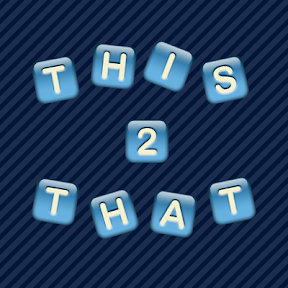
The next phase in the How to Market a Mobile App series was to try a whole new look and feel. While I feel like the design of This to That was actually pretty good, it's obvious design is not really my strong suit. I hired a professional design company that reworked my icon for about $150.

I dropped the new icon into the game and had my wife play with the This to That theme generator for a while. She came up with what is now the current This to That default theme. We are pretty pleased with the way it turned out and it appears users are too.

Promotional Images

Another thing we changed were the promotional images that show up with the app on the app store. I had reviewed dozens of my favorite apps to see which ones I thought had the most compelling promo images. I noticed I was most enticed by promotional images that featured interesting design with the application screenshot embedded in the image (rather than the whole image itself).

I had tried my hand at this kind of design and these are what I had before:

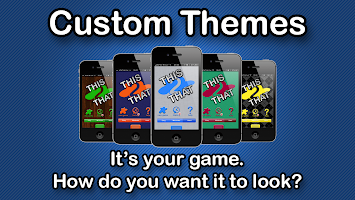
Game Center Integration Intuitive Play Social Features Custom Themes

In an effort to try something new (and to get a new release out faster), I decided to replace these with simple screenshots. You can see them on the This to That on iTunes page. I may have my designers throw together some new promotional images if I start to get enough data about new downloads that I'll be able to share any significant observations about their effectiveness.

Results

Before/After Pro Design

The new graphics don't appear to have had a huge impact on new users. It looks like about 10% - 20% more downloads than before. None of the current users have complained in comments or ratings so that's probably a good sign really. I think the most interesting statistic I've observed this time around is in session duration.

It appears whatever I added between 3.5 and 4.1 was displeasing to users. We went from an average of 4 minutes per session to about 2 minutes per session. 4.2 brought us back up and 5.0 and 5.1 have leveled us off at about 3 minutes per session, but almost all of our players now play every day.

A few other observations

  • Very few people attempt to play multiplayer
  • Many players open the drawer; very few swipe it
  • Since we moved the help button, more people click help
  • There are very few social sharing events
  • Most common incorrect words: TOOS, BEAS, SEAP, BONS, BAIN

Next Steps

I have a release ready to go in hopes that we get more reviews on the app store (hopefully positive too). We have always had a feedback button in the app, but at some point the link broke so presently it takes you to the app store but not to the app's page. To fix this, we started using appirater. On a related note, I recommend using cocoapods for iOS app dependencies.

Saturday, April 19, 2014

How to Market a Mobile App: Professional Review Sites

Mobi Apps Review

I've been working on the revealing (and humbling) How to Market a Mobile App series so I've found myself more open to some ideas that I usually am. A few months ago, I got an email from the owner of Mobi Apps Review. I've heard about sites like this before that establish a viewership on their website and on social networks. Some friends tried it out paying as much as $5,000 for one review.

Mobi purported to have 25,000 followers on twitter and the same on facebook. The offer was to write a review and publish it on all of their social networks for $25. I figured, it's worth 25 bucks just to know what a little exposure could do for me. Besides, it'll give me something to post about on the Mobile Magic Developers facebook page.

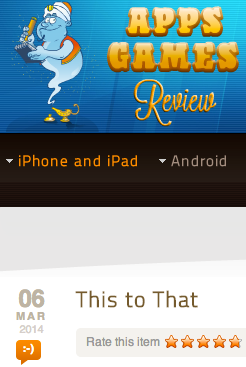
The Mobi Apps Review of This to That came out March 6th, 2014. It was nice to see that the review was generally positive. Not all of the reviews on Mobi are positive so I feel like the reviewer really did enjoy the game.

Results

I reviewed the Google Analytics for the 3 weeks before and the 3 weeks after the Mobi review was posted. I saw no discernible effect on new users.

Conclusion

I don't think the lack of results necessarily indicates that the review had no impact. To be sure, I could've spent more effort promoting the review. I also, unfortunately, have no insight into how many viewers actually saw the review. Of those viewers, I have no idea how many visited the This to That for iOS app store page. Even if I did, I have no way of knowing how many people who view the app store page actually download the application and whether or not the review had an impact on that.

All in all, I think it was worth 25 dollars, and I expect to get value out of it at some point. Now, I can mention the 5 star review in the profile description which needs to be revamped anyhow. I can also reference it in posts on our facebook page. The gestalt effect of having an additional third-party link out there is likely to help support my efforts in marketing This to That.

How to Market a Mobile App: Design Counts

Default theme progression

As I discussed previously in the How to Market a Mobile App series, one of the first things I could do to improve user experience in This to That for iOS is not only to support the look and feel of iOS 7 but also to improve the color selections of the default theme. At the time I released the latest version of This to That, the iOS 6 SSL vulnerability hadn't been discovered yet, so I have a new default iOS 6.0 theme (that nobody will ever see again). :)

Results

There were no notable changes in new user acquisitions nor in returning user frequency. There may have been a slight reduction in session time and a slight increase in screen views per session. Reviews are still generally positive, but it appears changing the theme had very little impact on the performance of the application

Next Steps

I had a new icon designed professionally. I made the current icon and while I think it's pretty cool, it definitely doesn't look quite as engaging as the new one does. I need to re-release This to That with that icon in hopes that it increases new user acquisition.

Screenshots

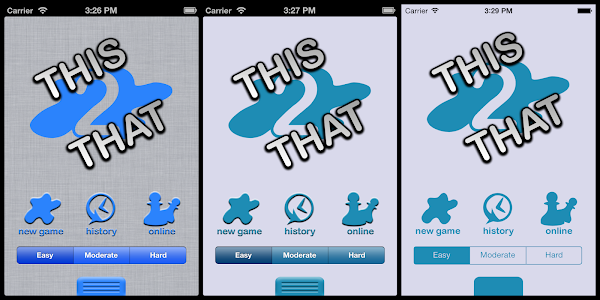
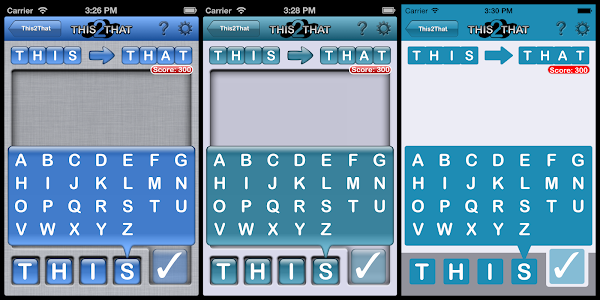
Each set of screenshots shows the original theme on the left, the new default iOS 6 theme in the middle, and the new flat iOS 7 theme on the right. You can still select the "reflective" tile type in the theme builder to get the old look and feel, but the linen background is no longer available to iOS 7 users. Instead, it's just gray.

Basically, the theme is lighter, flatter, and sharper. The last few images demonstrate the difference in texts. Instead of inlaid icons for the letters, they're all just flat letters in a built in system font. Eventually, I think I'd like to switch the fonts throughout the application to use iOS 7's default font.

Default theme progression

Letter selector theme progression

Complete game theme progression

History theme progression

Game font changes

Letter selector font changes

Saturday, March 15, 2014

A Limerick Standup: AngularJS, PhantomJS, and Jasmine

Logs

In honor of St. Patty's Day, I decided a limerick standup would be appropriate:

I've made some good progress with Angular
Though nothing of mention particular
     I have some good tests
     That pass in PhantomJS
And if Jasmine were here, I would strangle 'er

Friday, February 7, 2014

Sending Java Stack Traces to Loggly

Logs

Recently at my new Autopilot contract, I was tasked with configuring some of our applications to send log entries to Loggly. We're using log4j, rsyslog, and syslog4j.

The Loggly service produces nice data which are easily accessible through a pleasant interface. The configuration was simple, logging works from anything that can log with syslog, and Loggly support was generally responsive (it definitely helps to have a corporate relationship).

Once we had the environment configured, we configured log4j following Loggly's Log4j Setup instructions. We were getting log messages into loggly in no time. The only problem was that we weren't getting stack traces.

This was a little bit confusing because the setup document reads:

You can send your Java logs using Log4j. The method shown supports multi-line events such as a Java stacktraces over Syslog.

I dug through the my usual channels looking for someone else who had the same experience. All I was able to find really was this one Stack Overflow question.

Not really being a Java guy, I assumed I was just missing something. In fact, the folks at Loggly told me I was missing something too. :) I first started looking into the rsyslog documentation regarding multi-line log entries (like stack traces). I noticed that the file input module supports a ReadMode attribute, but the udp input module does not.

I added a rolling file appender to my log4j.properties file, I configured the imfile in our rsyslog config file, and we were off to the races. Good looking easy to read stack traces. It's worth noting I'm using the paragraph ReadMode because not all lines in a Java stack trace are indented. Thus, I needed a full blank line between log entries. This is more or less our log4j.properties configuration for the rolling file appender:

  log4j.appender.ROLLING=org.apache.log4j.rolling.RollingFileAppender
  log4j.appender.ROLLING.File=/tmp/log4j.log
  log4j.appender.ROLLING.rollingPolicy=org.apache.log4j.rolling.TimeBasedRollingPolicy
  log4j.appender.ROLLING.rollingPolicy.FileNamePattern=/tmp/log4j.log.%d{yyyy-MM}.gz
  log4j.appender.ROLLING.layout=org.apache.log4j.PatternLayout
  log4j.appender.ROLLING.layout.ConversionPattern=%n%d{yyMMdd.HHmmss,SSS} %t %C{1}.%M %p: %m%n

This was well and good but I wanted to make sure I wasn't missing a simpler alternative. The docs said it would work via rsyslog udp and I wanted to know why I was having such trouble. I looked at the network traffic coming from my dev instances. I noticed that my messages didn't include any stack trace information at all. It wasn't just a multiline issue really. It was that stack traces were never being logged by syslog4j. I looked into the ConsoleAppender and found that it gets its append behavior from WriterAppender.subAppend. That method is how the console gets stack traces after the message has been written using the layout.

if(layout.ignoresThrowable()) {
    String[] s = event.getThrowableStrRep();
    if (s != null) {
        int len = s.length;
        for(int i = 0; i < len; i++) {
            this.qw.write(s[i]);
            this.qw.write(Layout.LINE_SEP);
        }
    }
}

I started looking at the Syslog4jAppenderSkeleton.append method. I noticed that this appender never logs stack traces at all.

protected void append(LoggingEvent event) {
 if (!this.initialized) {
  _initialize();
 }
  
 if (this.initialized) {
  int level = event.getLevel().getSyslogEquivalent();
   
  if (this.layout != null) {
   String message = this.layout.format(event);
   
   this.syslog.log(level,message);
   
  } else {
   String message = event.getRenderedMessage();
   
   this.syslog.log(level,message);
  }
 }
}

It was no wonder I wasn't getting stack traces into loggly. I looked back at the ConsoleAppender and wondered what the layout.ignoresThrowable was. I looked at the docs and found that the PatternLayout.ignoresThrowable method always returns true because it can't handle throwables. In fact, the same page reads:

A flexible layout configurable with pattern string. This code is known to have synchronization and other issues which are not present in org.apache.log4j.EnhancedPatternLayout. EnhancedPatternLayout should be used in preference to PatternLayout. EnhancedPatternLayout is distributed in the log4j extras companion.

Easily convinced, I switched to the EnhancedPatternLayout. I configured the ConsoleAppender to use the enhanced pattern layout and I added the %throwable configuration item to it. Viola! Stack traces . . . by my own doing. I copied the configuration to the Syslog4jAppender section, started the long deployment process, and watched in disappointment as I still had no stack traces.

I started messing with the layout on my Syslog4j appender and noticed nothing I did changed the resulting log message. That seemed a little odd, so I dug into that a little. I dug back into the Syslog4jAppenderSkeleton.append again. I set a breakpoint on this.layout.format(event); and attached the debugger. My breakpoint was never hit. The layout was always null!

I set out in search of where that field was getting set. We're using the log4j.properties file so our configuration is parsed by the PropertyConfigurator parseAppender method. This is a pretty big method but here's what I noticed:

if(appender.requiresLayout()) {
    Layout layout = (Layout) OptionConverter.instantiateByKey(props, layoutPrefix, Layout.class, null);
    if(layout != null) {
        appender.setLayout(layout);
        LogLog.debug("Parsing layout options for \"" + appenderName +"\".");
        //configureOptionHandler(layout, layoutPrefix + ".", props);
        PropertySetter.setProperties(layout, props, layoutPrefix + ".");
        LogLog.debug("End of parsing for \"" + appenderName +"\".");
    }
}

So again I looked at the implementation of Syslog4JAppenderSkeleton and found that requiresLayout always returns false!

public boolean requiresLayout() {
    return false;
}

This struck me as odd and it made me wonder how anyone ever was able to use the layout property with syslog4j. It turns out that DOMConfigurator.parseAppender ignores requiresLayout and sets the layout any time there's a layout tag in the log4j.xml configuration file.

// Set appender layout
else if (currentElement.getTagName().equals(LAYOUT_TAG)) {
    appender.setLayout(parseLayout(currentElement));
}

Having a fundamental opposition to switching to XML, I needed another way to get the Syslog4jAppender to respect my layout desires. To my chagrin, the best approach I could come up with was to subclass the Syslog4jAppender and override the requiresLayout method:

public class Syslog4jLayoutAppender extends Syslog4jAppender {
   @Override
   public boolean requiresLayout() {
      return true;
   }
}

I switched my configuration to use this appender, redeployed, and my stack traces started to appear in loggly. Unfortunately, they were all on one line with character codes in place of linefeeds. Preferring easy to read stack traces, I flipped the rolling file appender back on and considered this the best alternative. In short, here's how I get stack traces into loggly:

  1. Configure a RollingFileAppender
  2. Configure rsyslog to use the imfile module to monitor the file with paragraph read mode
  3. Profit

Saturday, January 25, 2014

How to Market a Mobile App: Knowledge is Power

Data!!

If you're going to understand how changes you make to your application affect your users or how effective your marketing strategy is, you're going to need data. All of the app markets provide decent data about downloads, active users, ad impressions, etc., but these are no match for deliberate data collection and usage statistics.

In the early days of This to That for iOS, we didn't include any analytics. We relied heavily on iTunesConnect to provide the statistics we needed to determine the effects of our changes. Google Play provides much better analytics out of the box including active installs, device statistics, OS versions, etc., so we had to make a lot more inferences.

For example, we could see daily downloads but we had no idea how many users we were retaining. At that point, we were releasing often so we could compare our download statistics to our upgrade statistics to get a feel for that. We further refined our estimates when we added Game Center support. Comparing the new user statistics to the Game Center names I didn't recognize (seriously), I estimated about half of the users use Game Center. Thus, we could infer that for every player who reported a score to the leaderboard, there was a roughly equivalent user without a Game Center account.

We also planned to be ad supported out of the gate, so we were able to get some usage information from ad impressions. Our app has a roughly 98% fill rate and filled ads cycle about every 3 minutes. Combining that information with estimated users per day, we could guess how much time people spent playing our game.

Several versions back, we started using Google Analytics to collect anonymous (we're not the NSA after all) usage statistics. Now we get a much more detailed view of our users and how they play This to That. I recommend developers consider analytics to be an inextricable part of any minimum viable product. Without analytics, there's no way I could write the How to Market a Mobile App series as I'd have no way of knowing how these experiments impact our application's performance in the app market.

Starting Point as of Version 4.2

  • 910 sessions lasting an average 3.5 minutes per month
  • 108 of these sessions are new users (about half are iOS 7)
  • About 80% of the sessions end on the first screen and last less than 10 seconds
  • About half of the users play at least 10 times per month
  • About 90% of users play This to That at least every other day

I think these statistics tell us a few meaningful things about This to That. The first and I think most obvious inference, which is the reason I'm writing this series (and is likely the reason you're reading it): people can't find and don't hear about This to That. To resolve this, we've added social features, game center, multiplayer gameplay, and have tried advertising. As of yet, to no avail.

Second, I think, is that many users never get past the first screen. I think that's likely because the look and feel of the default game theme may not be appealing (I'm not a designer after all). iOS 7 users are less likely to engage than iOS 6 users; it might be worth updating the default look and feel of the application for iOS 7 users.

I think there are some positive observations in these data too. Users who play the game tend to play it often (at least for a while). They tend to play several times a day for short periods. This gives me insight that the game should be quick to get into. Perhaps, for example, the game should start in the game screen and have a menu option for going to what's now the home screen.

Things to do in Version 5.0

  • Create an iOS 7 default theme
  • Clean up the default color scheme for all new users
  • Make a better app description for iTunes
  • Make more compelling graphics for the images in iTunes
  • Clean up the icon

I'm hoping we'll see a larger number of new users by having more compelling marketing in our This to That iTunes profile. I'm also hoping that the improved icon and cleaner default theme will make new users more likely to complete their first game (most users who complete the first game complete many subsequent games). I'm hoping having more users and retaining a higher percentage of them will also result in a higher likelihood that users will share the game with friends.

There was a slight drop in retention after we released the multiplayer version of This to That. I think that users were frustrated when they tried to connect to a multiplayer game, but nobody else was playing. That frustration overpowered the interest in playing the original single player version. When we released that version, we were hoping it would encourage users to invite friends and family to play. Ideally, the new design and higher retention rate would also result in more available online users for random game center match creation.

What's it Going to Take?

Well, one thing I like to do as an independent developer is work on the cheap. I think that I've managed, on my own, to make a fun and entertaining application; however, I admit it lacks a certain je ne sais quoi. Perhaps it lacks the polish of the kinds of games people make when they have designers on staff. Perhaps it feels unprofessional. Of all of the negative feedback I've ever gotten, I don't think anyone has said, "the game isn't fun." So, I'm going to have some artwork done professionally. The game, in its current state (with the extensive theming) would be difficult to overhaul, so I'm going to focus on 3 components: the icon, the screenshots in iTunes, and the default theme. I'm hoping to get all of this done for about $500 - $750. I have a few quotes in and I think this is a reasonable expectation.

Friday, January 24, 2014

How to Market a Mobile App: Where to Start

confused emoticon O.o

Mobile Magic Developers has several applications on various mobile marketplaces now. My 2 year old daughter loves Cow Says Moo. My mother in law has been playing This to That for years. Our friends get goodnatured laughs with Said Obama. All in all, developing mobile applications has been a really positive experience.

In graduate school marketing classes, we spent a lot of energy discussing myriad ways large organization with massive marketing budgets could broaden their customer bases. I'm sure that information is still somehow useful but it surely doesn't help independent developers like Mobile Magic Developers who don't have a marketing budget, let alone enough to hire an MBA marketing consultant. In fact, our marketing campaigns like the rest of our expenses, are still being paid out of our pockets.

So, where do you start on the quest to release a popular mobile application?

I Have No Clue O.o

I sincerely have no idea. I've read a lot of good blog posts about marketing mobile applications. I've purchase some really interesting books on the topic. My brother has a BA in marketing. I did get some marketing exposure in college. Despite all of this, I still have some really great apps nobody uses.

That's why I'm starting the How to Market a Mobile App series (well, that and I haven't blogged in almost 2 years and it's high time I get back to it). I'm going to start by introducing, with complete candor, where we are with This to That for iOS today and how we spent the last few years getting to what is effectively a good starting point.

I have a new plan for spreading the word about This to That with a limited budget over the next few months. I'll blog about every strategy I try and how each idea fails and succeeds (including all of the nitty-gritty and sometimes embarrassing details). Every time I add a new post, I'll include it in the index below so bookmark this page for a convenient starting point.

Worst Case Scenario? :*(

Well, as I've shared, I don't really know much about successfully marketing a mobile application, but I have learned a handful of things not to do. That tells me that the worst case scenario of writing this series both for me the writer and you the reader (and subscriber hopefully) is that together we learn a few more things not to do. But, who knows? Perhaps we'll figure out the right formula for getting our wonderful apps into the hands of the target audience who can get the most value out of them.

How to Successfully Market a Mobile Application

Wednesday, March 21, 2012

First Small Business, Big Difference for the NBCF a Success!

National Breast Cancer Foundation Banner

If you followed our Small Business, Big Difference program, you know that our first Small Business, Big Difference to support the National Breast Cancer Foundation ended Februrary 18th, 2012.

Thus, there are two pressing topics:

First, I'd like to apologize for taking this long to get these results out there. I know it's been a while, but I've been a little busy. On February 17th, 2012 my wife delivered our first child and we've been enjoying some family time.

Second, when we set out to start the Small Business, Big Difference program, we knew it'd take a few tries for it to catch on. We figured our first attempt would produce modest results; however, we were so excited that we were able to generate such interest in the program that we rounded our donation up to $100.00.

We'd like to thank everyone who donated or participated in the program and we'd like to thank the NBCF for letting us raise funds for them with the Small Business, Big Difference program. We're looking forward to working with them again in a future promotion.

Friday, February 10, 2012

JavaScript for Photoshop - When Macros Aren't Enough

This2That Tile Sample

A few years ago, a fellow named Brian Dorn got in touch with me. He was working on his doctoral dissertation at Georgia Tech and he needed participants. I met him in Atlanta and found out that his study was about scripting with Photoshop. That was the first I'd ever heard of Adobe Photoshop Scripting.

A few weeks ago when I started working on a new word game This2That for Mobile Magic Developers, I needed to generate 38 tiles with letters, numbers, and punctuation. The task was tedious and the macros just couldn't make it any easier. Then I realized I had the embossing all wrong and I had to start over!

Frustrated, I tried to think of a better way. I remembered Brian Dorn and I started looking into this Adobe Photoshop JavaScript thing. I was very pleased when 15 minutes of script became an easily reusable tile generating utility. Now, I can take any PSD, open it up, select any text layer, and have the script generate a PNG for each letter I need

I thought this little known feature would make for interesting reading for both programmers and designers so here's my script:

// call the method that does all of the work
main();

// wrap the code in a method to make it easier to debug
function main() {

 // make sure you're working in a document and have a text layer selected
 if (!activeDocument || !activeDocument.activeLayer || activeDocument.activeLayer.kind != LayerKind.TEXT)
 {
   alert("Please select a document and a target text layer.");
   return;
 }
 
 // set up some information about the current file
 var textLayer = activeDocument.activeLayer;
 var path = activeDocument.path;
 var fileName = activeDocument.name;
 
 // remove the extension on the file name
 var extensionPosition;
 if (extensionPosition = fileName.lastIndexOf('.'))
  fileName = fileName.substr(0, extensionPosition);

 // get a good place to put the file
 var outputFolder = Folder.selectDialog("Select a target folder.", path);
 
 // set up the letters we want images for
 var characterMap = [
  ["question", "?"]
 ];
 
 // and add the lowercase alphabet and numbers
 characterMap = characterMap.concat(getAsciiRange(97, 26), getAsciiRange(48, 10));

 // for each character, update the selected text layer and save a file
 for (var i = 0; i < characterMap.length; i++)
 {
   var character = characterMap[i][1];
   var fileSuffix = characterMap[i][0];
   
   textLayer.textItem.contents = character;
   
   var file = new File(outputFolder + "/" + fileName + "_" + fileSuffix + ".png");
   var options = new PNGSaveOptions();
   options.interlaced = false;

   activeDocument.saveAs(file, options, true, Extension.LOWERCASE);
 }
};

// a little helper method to make a range of letters and their
// filename extensions
function getAsciiRange(from, count) {
 var result = [];

 for (var i = 0; i < count; i++)
 {
  var character = String.fromCharCode(i + from);
  result.push([character, character.toUpperCase()]);
 } 
 
 return result;
}
 

Wednesday, February 8, 2012

Small Business, Big Difference - NBCF Approved

National Breast Cancer Foundation Banner

Last week I wrote a blog post introducing our Small Business, Big Difference program to raise money for the National Breast Cancer Foundation. This week, I got in touch with them and they gave us the go-ahead to run the fundraiser. We're very excited about the news!

So, we want to make sure you know how you can help! There are three ways that you can help us raise money to give to the NBCF.

Spread the Word


Get the App

  • Download the Jane Austen Quote of the Day Widget application.
  • Enjoy the application! We'll donate all ad revenue from the Jane Austen widget during the promotion period of Sunday, February 12th, 2012 and ending Saturday, February 18th, 2012.
  • If you love the app, buy the Jane Austen Widget Upgrade for less than a buck and we'll donate that too!

Want to Give More?

You're more than welcome to give as much as you want! You can visit the Mobile Magic Developer's Small Business, Big Difference for NBCF fundraising site powered by StayClassy.

If you have any questions at all, please feel free to contact us through our facebook page or twitter account. We'd love to address any concerns you may have.

Saturday, February 4, 2012

National Breast Cancer Foundation - Small Business, Big Difference

National Breast Cancer Foundation Banner

James and I recognize that we get a great deal of benefit out of writing mobile applications with Mobile Magic Developers. We enjoy the time together, the camaraderie, the learning experiences, and the opportunity to bring a little joy to a much larger audience. Along the way we've had a lot of support from friends, family, and the numerous customers who've downloaded our apps.

We wanted to find a way to give something back as an enthusiastic "Thank You" from the Mobile Magic Developers team to you. We've decided we're going to try something we call Small Business, Big Difference. Periodically, we're going to choose one of our applications and for a period of time, all proceeds from that application will be donated to a charitable organization. That includes sales and ad revenue.

For our inaugural Small Business, Big Difference attempt, we've decided that we'll donate all revenue generated by our Jane Austen Quote of the Day Widget available on the Android market to the National Breast Cancer Foundation. We've even added a new background for your widget just for this occasion!

Why the National Breast Cancer Foundation

We reviewed dozens of charitable organizations dedicated to promoting breast cancer research, helping breast cancer survivors, and comforting those fighting with breast cancer today. We considered each organization's rating on Charity Navigator and the NBCF scores on Charity Navigator were remarkable including a maximum score for accountability and transparency, 83.1% of revenue dedicated to program expenses, and a solid plan for growth.

We also felt strongly for the foundation's mission to save lives through early detection by providing education and mammography, particularly to women in need. The NBCF works with almost 100 clinics in all 50 states to provide free mammograms and diagnostic services to underserved women. Each sponsored facility is required to have the capacity to provide continued treatment to women after an abnormality is found or breast cancer is diagnosed.

How You Can Help

Your role is easy. Download the Jane Austen Widget from the Android market, use the "Share" buttons to share your quotes on Twitter and Facebook, encourage your friends to get the app. If you really like it, purchase the Jane Austen Widget Upgrade, the ads will go away and we'll donate the proceeds from your upgrade too.

The program will run for 1 week starting Sunday, February 12th, 2012 and ending Saturday, February 18th, 2012. Download the free application today and help us spread the word about the application and the promotion. The more people who have the free app, the more ad revenue we'll be able to donate. Don't buy the upgrade though until the week of Valentines Day so we can donate your upgrade too.

We hope to make this program a huge success because we're already looking into our next charity (hopefully promoting children's literacy with proceeds from our educational apps for kids). We're excited about this opportunity and with your help we can prove what a big difference a small business can make.

Saturday, November 26, 2011

Mobile Magic Developers Co-founded by Autopilot Founder

Mobile Magic Developers

Autopilot Consulting, LLC founder Patrick Caldwell has joined forces with long time friend and coworker James Brechtel to found Mobile Magic Developers, LLC.

James and I worked together for a few years several years ago and have been close friends ever since. It was an easy decision to get together and start developing mobile applications.

Mobile Magic Developers focuses on developing fun and exciting mobile products like educational mobile applications for kids, amusing home screen widgets, and mobile utilities. Autopilot Consulting focuses on … well consulting.

When your company is ready for your own custom mobile application, come talk to Autopilot about how we can help you wow your customers and outshine your competitors with a mobile application of your own. We'll apply our mobile experience as well as the talents of Mobile Magic to make sure you get the biggest mobile bang for your buck.

Mobile applications come in several varieties. Whether you're interested in native mobile applications or mobile skins for your web applications, we have the experience to get you there, save you money, and help you make the best decisions for your business, your customer, and your future.